
Follow these simple steps to block visitors who are using VPN or proxy services.
Step 1: Open VPN Settings
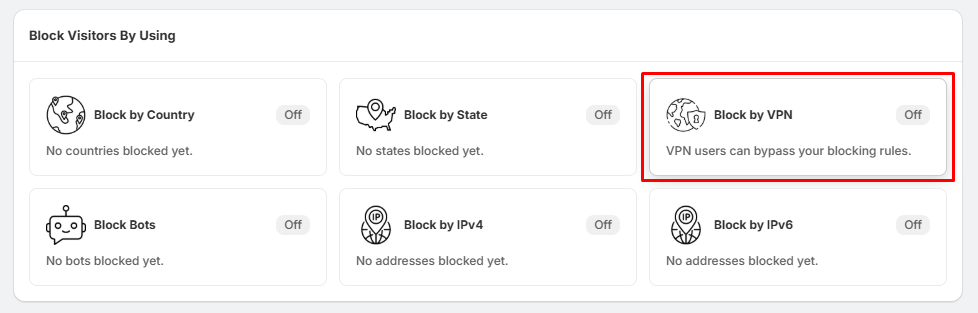
- Go to Block Settings.
- Locate the Block VPN section.
- Click Settings.
This will open the VPN Blocking settings page.
Step 2: Enable VPN Blocking
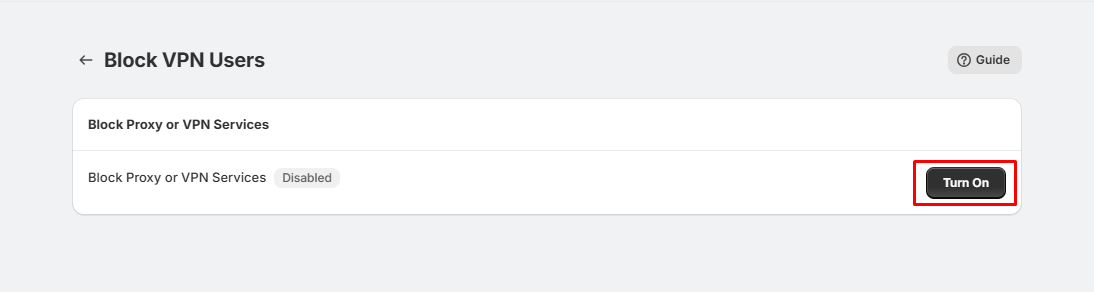
- On the Block VPN Users page, locate the Block Proxy or VPN Services option.
- Click the Turn On button.
- Once enabled, the status will change from Disabled to Enabled, and visitors using supported VPN or proxy services will be blocked based on your app settings.
Done!
- VPN Blocking is now active and will help prevent visitors from bypassing your country or state blocking rules by using VPN or proxy services.
Tips:
- Enable VPN Blocking along with Country or State Blocking for better protection.
- Test the feature using a VPN service to confirm it is working as expected.
- If you no longer want to block VPN users, simply return to this page and turn the feature Off.