
The Secret Link feature allows you to share blocked products or collections with specific users, even if they are located in a blocked country. The generated link remains valid for 24 hours (1 day).
Step 1: Open the Secret Link Page
- Navigate to Secret Link from the left menu.
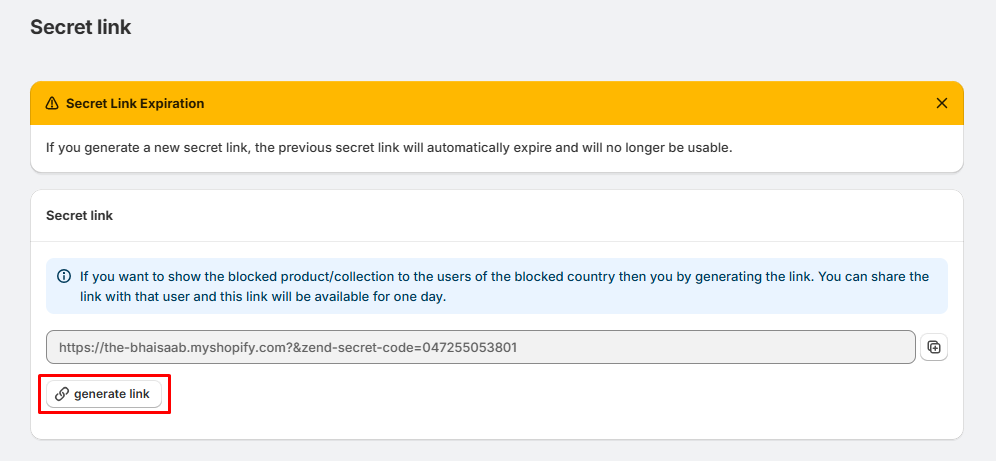
- You will see the Secret Link page with an information message and the current secret link field.
Note: If you generate a new secret link, the previously generated link will automatically expire and can no longer be used.
Step 2: Generate a Secret Link
- Click the Generate Link button.
- The app will automatically create a unique secret link.
The generated link will appear in the text box.
Example: https://your-store.myshopify.com/?zend-secret-code=047255053801
Step 3: Copy the Secret Link
- Click the Copy icon next to the generated link.
- The link will be copied to your clipboard.
You can now share this link with your customer or visitor.
Step 4: Share the Link
Send the copied secret link to the customer who needs temporary access to the blocked product or collection.
When they open the link:
- They will be able to access the blocked product or collection.
- The secret link remains active for 24 hours (1 day).
- After it expires, you'll need to generate a new link if access is required again.
Important Notes
- A newly generated secret link automatically invalidates all previous secret links.
- Secret links are intended for temporary access only.
- Only share secret links with trusted customers.
- If the customer cannot access the product after the link expires, simply generate and share a new secret link.
- You can generate a new secret link at any time.