
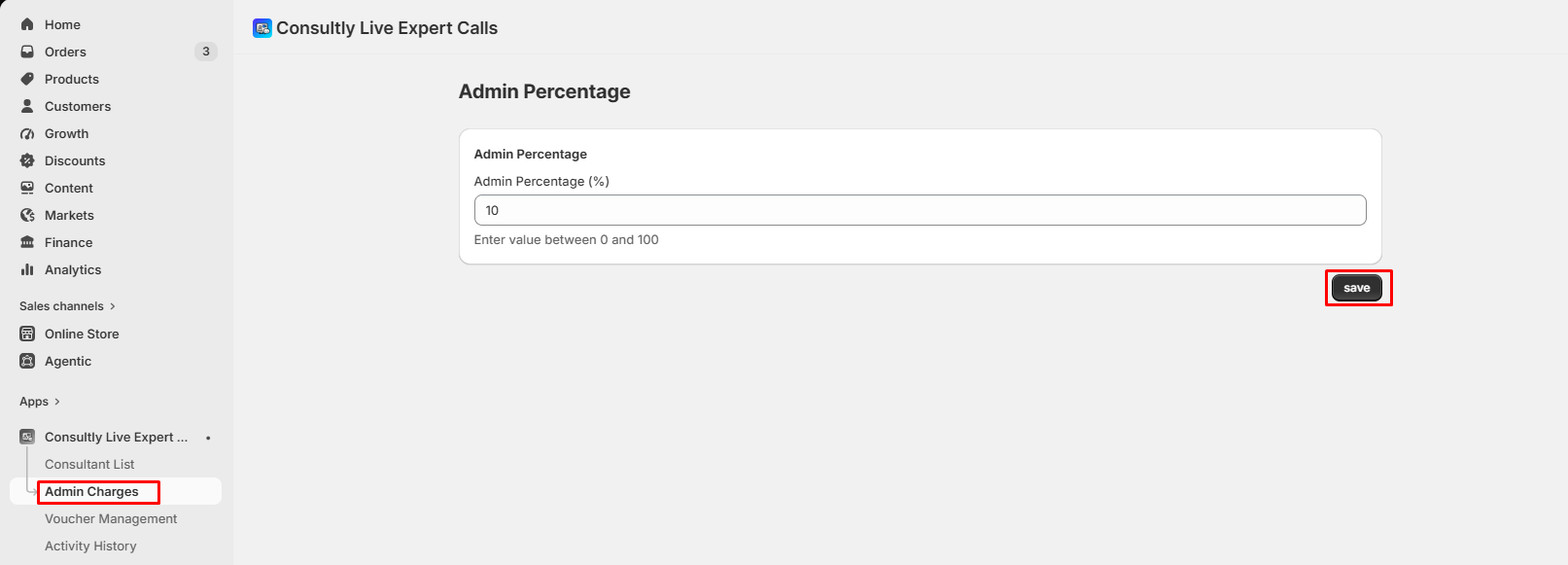
The Admin Charges feature allows you to set the percentage commission that the platform will deduct from every consultant transaction. Follow the steps below to configure the admin commission.
Step 1: Open Admin Charges
- From the Consultly Live Expert Calls dashboard,
- Navigate to Admin Charges from the left sidebar.
- You'll be taken to the Admin Percentage page.
Step 2: Enter the Admin Percentage
- Locate the Admin Percentage (%) field.
- Enter the commission percentage you want to charge on every consultant booking or consultation.
Example values:
- 5 = Admin receives 5%
- 10 = Admin receives 10%
- 20 = Admin receives 20%
Note: The value must be between 0 and 100.
Step 3: Save the Changes
After entering the desired percentage:
- Review the value.
- Click the Save button.
Your new admin commission will be applied to future consultant transactions.
Tips:
- The admin percentage represents the platform's commission deducted from consultant earnings.
- Only values between 0% and 100% are accepted.
- Updating the percentage affects future transactions and does not modify previously completed transactions.
- Ensure the percentage is configured carefully, as it impacts consultant payouts.