
BlockX Country Blocker allows you to block visitors who access your store through the Tor network. Tor users can sometimes bypass regular country-based blocking rules, so enabling this option provides an additional layer of protection.
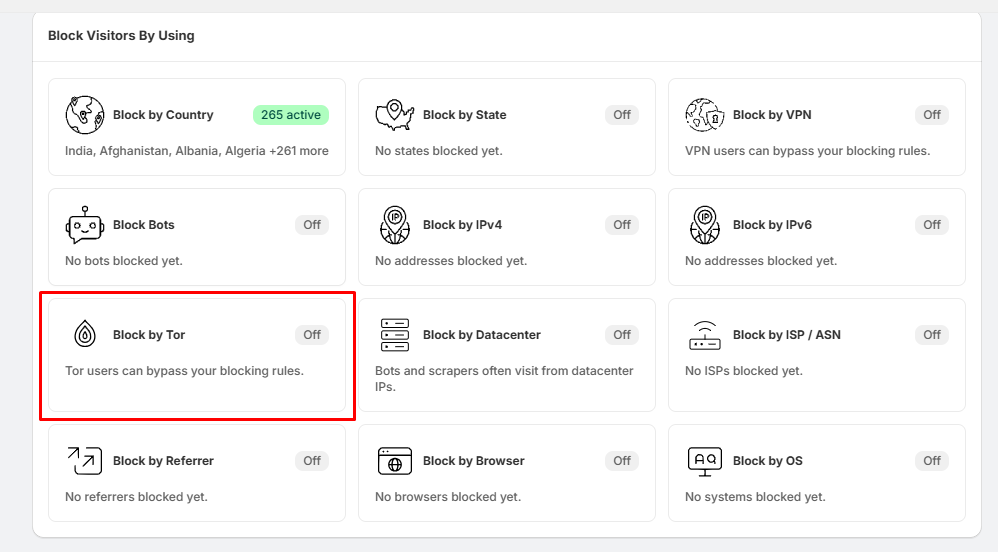
Step 1: Open Block by Tor
- Go to Block Settings.
- Locate the Block by Tor section.
- Click Block by Tor.
Step 2: Enable Tor Blocking
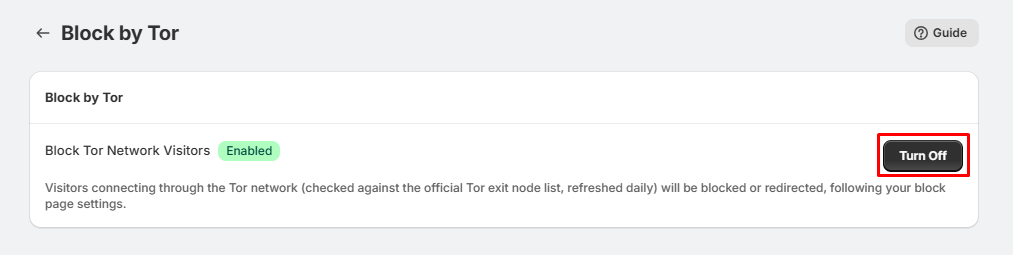
- On the Block by Tor page, you will see Block Tor Network Visitors.
- Click the Turn On button to enable the feature.
- Once enabled, the status will change to Enabled.
Step 3: Tor Visitors Are Blocked
- After enabling the feature, BlockX checks visitors against the official Tor exit-node list, which is refreshed daily.
- Visitors connecting through the Tor network will be blocked or redirected according to your configured block-page settings.
Tip:
- If you want to stop Tor users from bypassing your country-blocking rules, we recommend enabling Block by Tor along with your country-blocking settings.