
BlockX Country Blocker allows you to block visitors who access your store through datacenter and hosting provider IP addresses. These IPs are commonly used by bots, scrapers, and automation tools, so enabling this option provides an additional layer of protection.
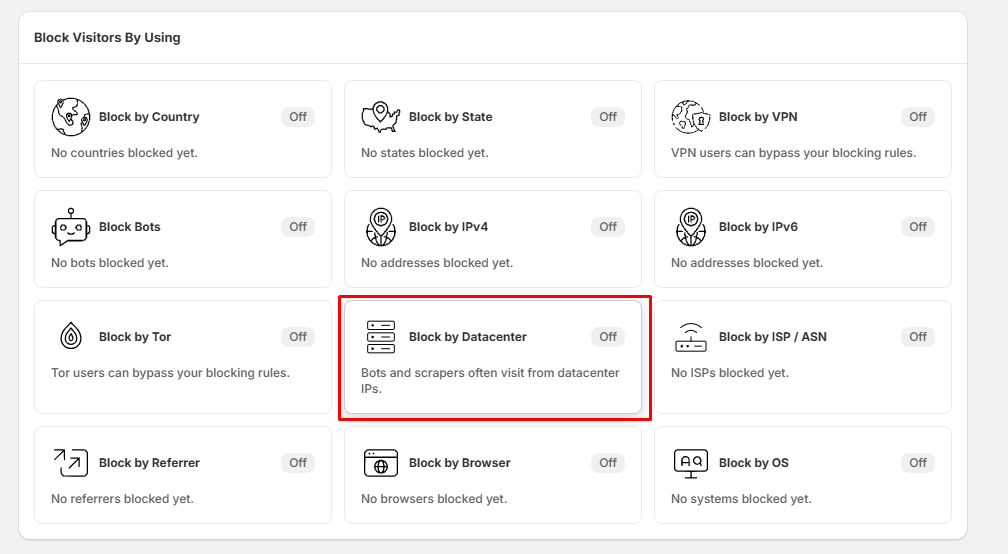
Step 1: Open Block by Datacenter
- Go to Block Settings.
- Locate the Block by Datacenter section.
- Click Block by Datacenter.
Step 2: Enable Datacenter Blocking
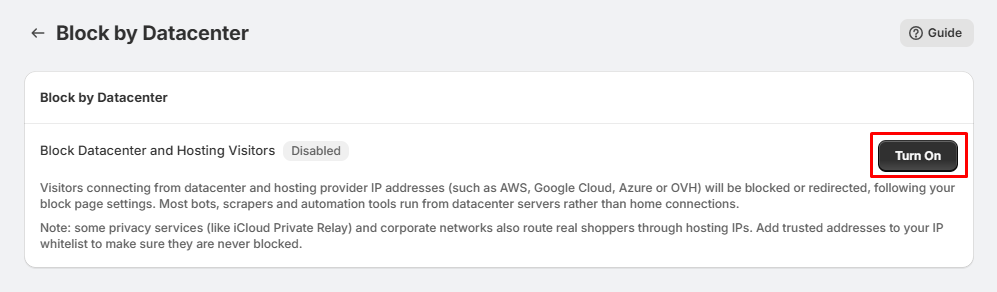
- On the Block by Datacenter page, you will see Block Datacenter and Hosting Visitors.
- Click the Turn On button to enable the feature.
- Once enabled, the status will change from Disabled to Enabled.
Step 3: Datacenter Visitors Are Blocked
After enabling the feature, BlockX identifies visitors connecting from known datacenter and hosting provider IP addresses, such as:
- AWS
- Google Cloud
- Microsoft Azure
- OVH
- Other hosting and cloud providers
Visitors connecting through detected datacenter or hosting IP addresses will be blocked or redirected according to your configured block-page settings.
Important Note:
- Some legitimate shoppers may also use hosting or privacy services. Corporate networks and services such as iCloud Private Relay may sometimes route genuine visitors through hosting IP addresses.
- If needed, add trusted addresses to your Trusted IP settings to prevent legitimate visitors from being blocked.
Tip:
- If you want to reduce unwanted traffic from bots, scrapers, and automated tools, we recommend enabling Block by Datacenter along with other protection features such as Block by Bots, Block by VPN, and Block by Tor.