
BlockX Country Blocker allows you to whitelist specific pages of your store. Whitelisted pages remain accessible to all visitors, even if they are blocked by country, state, IP, VPN, or bot rules.
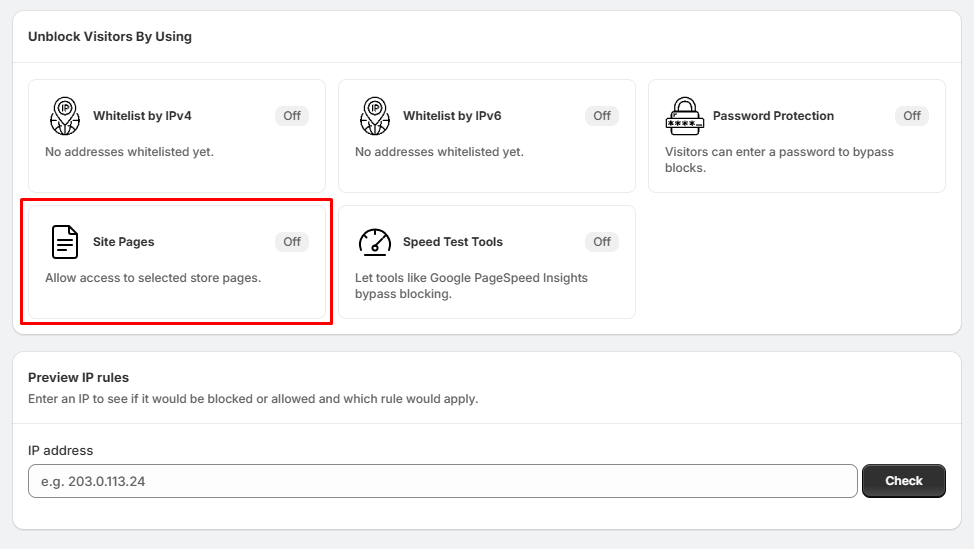
Step 1: Open Site Pages Whitelisting
- Go to Unblock Visitors By Using.
- Locate the Site Pages section.
Step 2: Select Predefined Pages to Whitelist
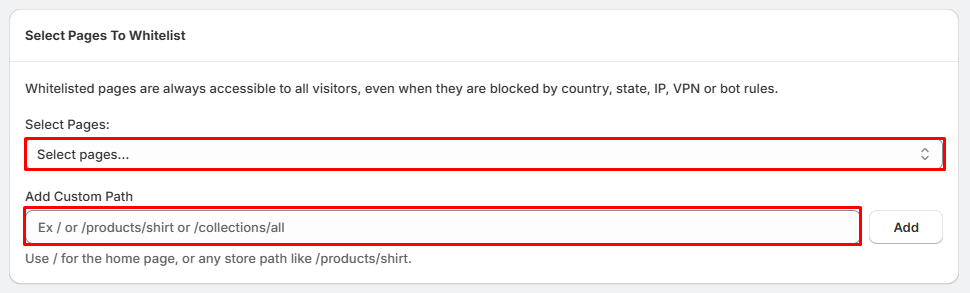
- Locate the Select Pages: field.
- Click the Select pages... dropdown menu.
- Choose the specific store pages you want to exempt from blocking.
Step 3: Add Custom Paths (Optional)
- Locate the Add Custom Path input field.
- Enter your desired store paths manually.
- Enter / to always allow access to your homepage.
- Enter specific paths like /products/shirt or /collections/all for targeted pages.
- Click the Add button to save the path.
Step 4: Verify Whitelisted Pages
- Once added, your selected links will appear at the bottom under the Selected Pages counter.
- Visitors will now bypass all active blocks when visiting these specific URLs.
Tips:
- Always double-check your custom paths to ensure they match your store's exact URL structures.