
BlockX Country Blocker allows you to whitelist specific website performance monitoring platforms. This ensures they can accurately scan your online store without getting blocked by your security firewall or country-based rules.
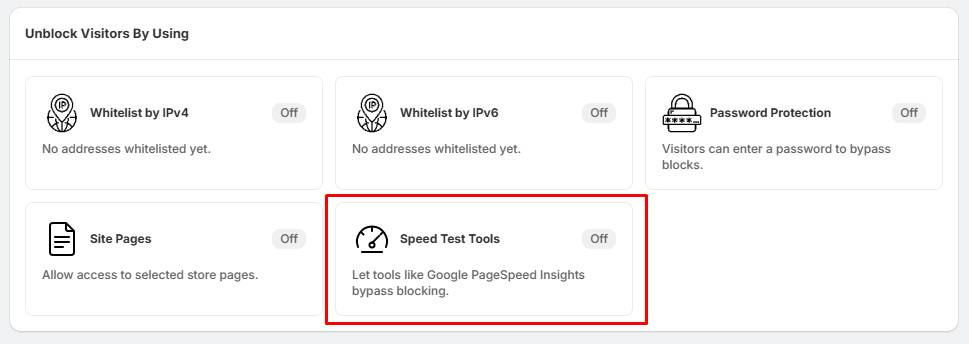
Step 1: Open Speed Test Tools
- Go to Unblock Visitors By Using.
- Locate the Speed Test Tools section.
- Click Speed Test Tools.
Step 2: Select Your Testing Tools
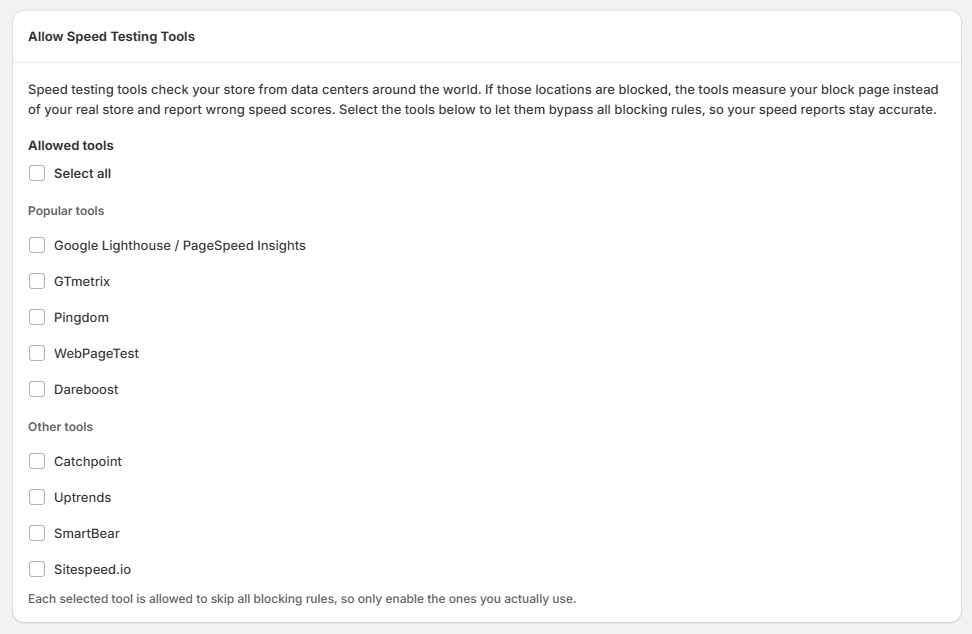
- On the Allow Speed Testing Tools page, look through the list of available services.
- Check the boxes next to the specific platforms you actively use to test your site.
- For general optimization tracking, we highly recommend checking Google Lighthouse / PageSpeed Insights.
Step 3: Enable the Whitelist
- Scroll to the bottom of the page and click the Save or Turn On button to deploy the new rules.
- Once saved, return to the main dashboard. The status indicator on the Speed Test Tools card will change from Off to On.
Tips:
- If your speed test reports are showing failing metrics, unusually high scores, or failing to load assets, your firewall might be serving them a "Block Page." Enabling this option lets them bypass your security rules so your performance data stays accurate.