
BlockX: Checkout Fraud Filter allows you to block specific email addresses and whole domains from placing orders on your store. This feature runs inside your Shopify checkout to prevent known fraudulent buyers or spam bots from completing their purchases.
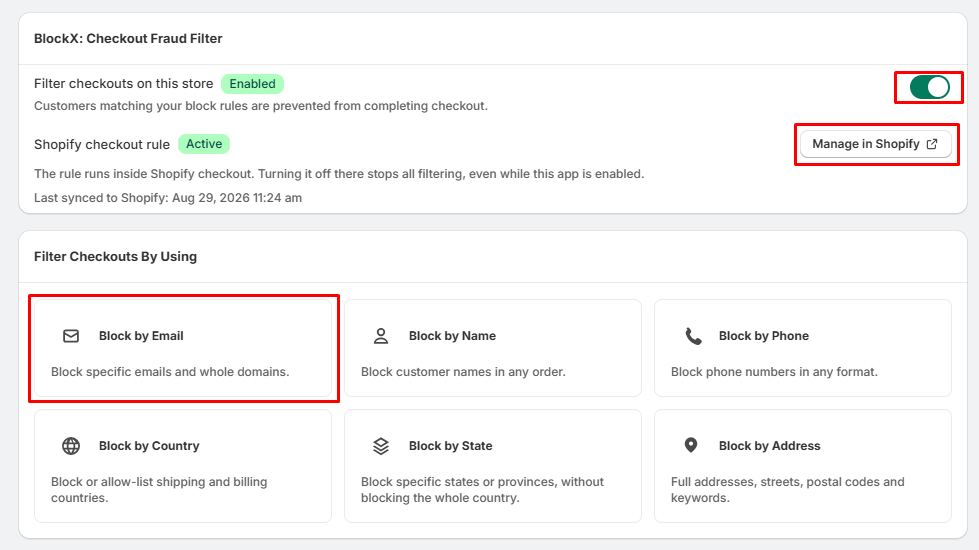
Step 1: Open Block by Email
- Navigate to the left sidebar menu under your apps and click Checkout Filter.
- Locate the Filter Checkouts By Using dashboard.
- Click the Block by Email card.
Step 2: Add Blocked Emails or Domains
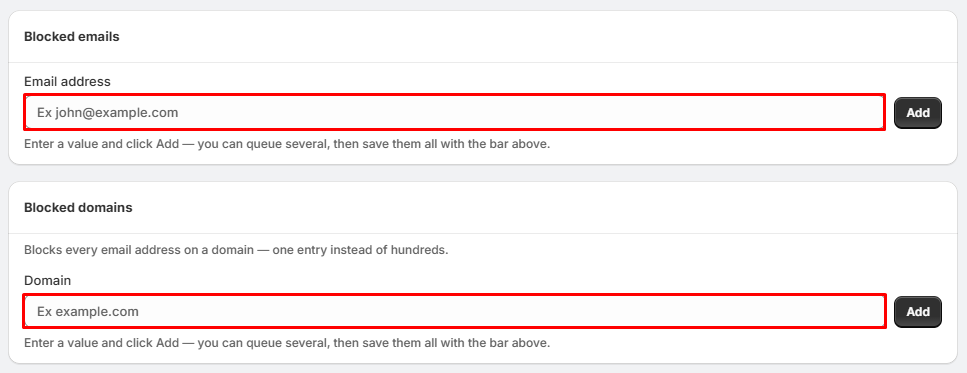
To block a single email address:
- Under the Blocked emails section, find the Email address input box.
- Type the exact email address you want to restrict (e.g., john@example.com).
- Click the Add button.
To block an entire email domain:
- Scroll down to the Blocked domains section and locate the Domain input box.
- Type the domain name you want to restrict (e.g., example.com). This stops every email address associated with that domain at once.
- Click the Add button.
Step 3: Fraud Filter Takes Effect
- Check your queue at the top of the screen to make sure your newly added rules are saved.
- Once active, the system automatically checks customer emails during checkout against your blocklists.
- Targeted buyers matching your rules will be blocked from completing their payment.