
BlockX: Checkout Fraud Filter allows you to block phone numbers in any format from placing orders on your store. This feature runs inside your Shopify checkout to prevent high-risk buyers or automated spam numbers from completing their purchases.
Step 1: Open Block by Phone
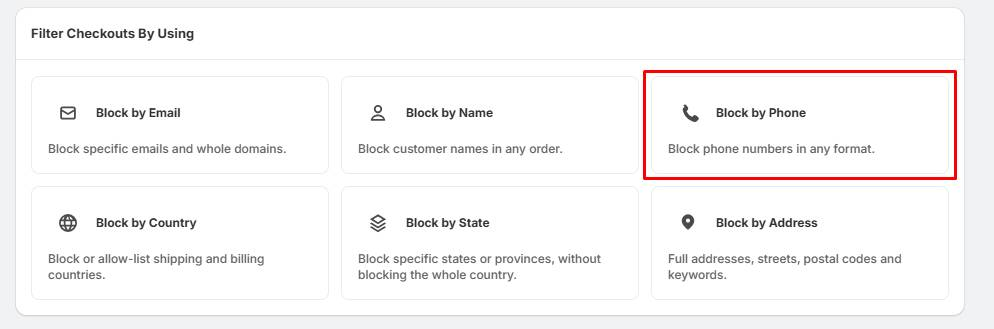
- Locate the Filter Checkouts By Using dashboard.
- Click the Block by Phone card.
Step 2: Add Blocked Phone Numbers
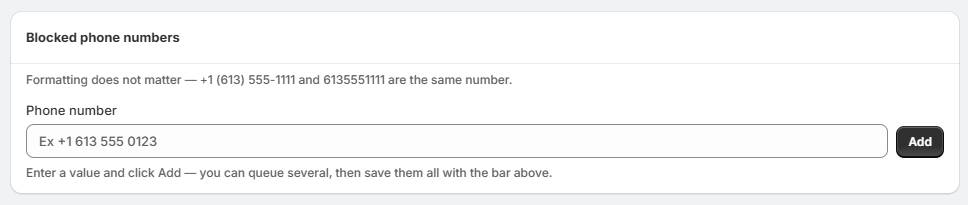
- Under the Blocked phone numbers section, find the Phone number input box.
- Type the phone number you want to restrict (e.g., +1 613 555 0123).
- Click the Add button
Step 3: Fraud Filter Takes Effect
- Check your queue at the top of the screen to save your newly added rules.
- Once active, the system automatically checks customer phone numbers during checkout against your blocklist.
- Targeted buyers matching your rules will be blocked from completing their payment.