
The Advanced section allows you to control how blocking rules check customer billing information and monitor your Shopify rule storage.
Step 1: Open Advanced Settings
- From the Checkout Filter settings:
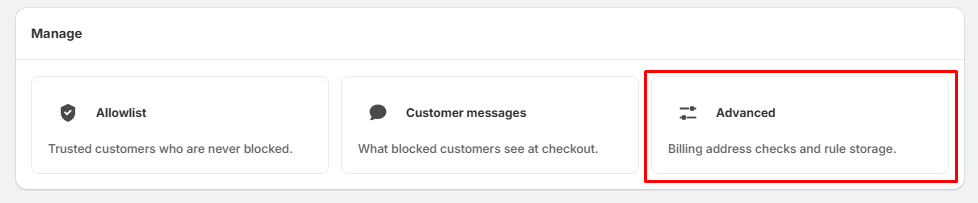
- Go to the Manage section.
- Click Advanced.
Step 2: Enable Billing Address Checking
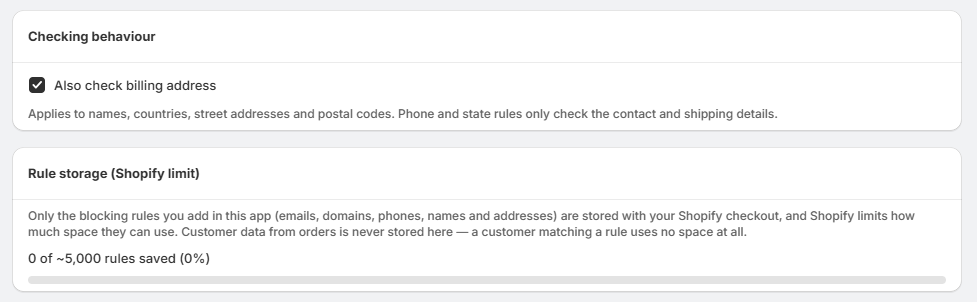
- Under Checking behaviour, you will find:
- Also check billing address
- Enable this option if you want your blocking rules to also check the customer's billing address.
- When enabled, the app can check: Customer names, Countries, Street addresses, and Postal codes
- Note: Phone and state rules only check the customer's contact and shipping details.
Step 3: Understand Rule Storage
- The Rule storage (Shopify limit) section shows how many blocking rules are currently stored with your Shopify checkout.
- Only the blocking rules added in the app are stored, including: Emails, Domains, Phone numbers, Names, Addresses
- The customer data from orders is never stored here.
Step 4: Check Your Rule Limit
- The storage counter displays your current rule usage, for example: 0 of ~5,000 rules saved (0%)
- This helps you monitor how much of the available Shopify rule storage is being used.